
Unexplained hours
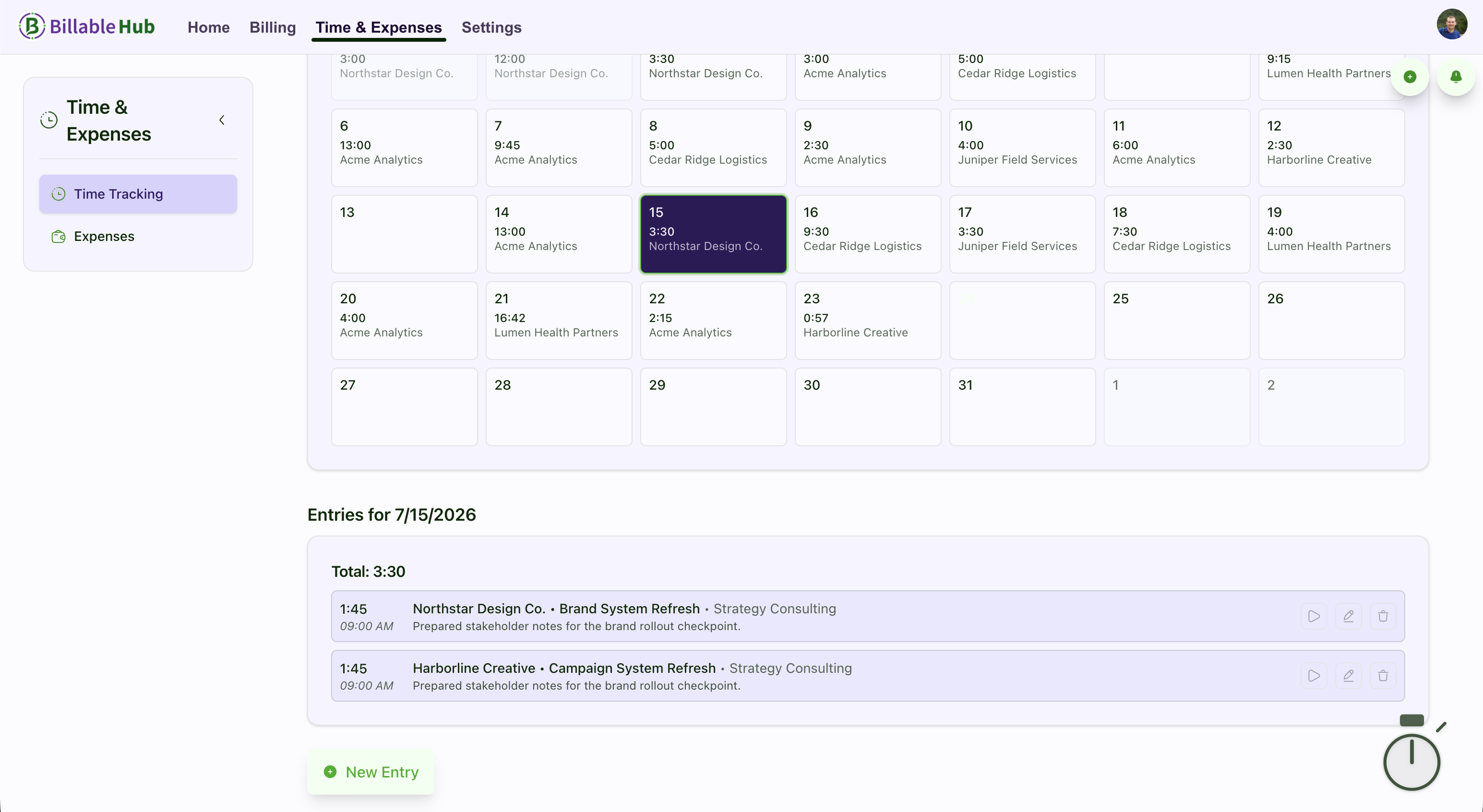
Track time against the client, project, job, and service so the final time summary has useful context.
Invoicing for software developers
Quote fixed-price or time-and-expense work, track your hours and expenses, and issue an array of unique invoices to your clients.
No signup required
Connected billing flow
Essentials plan
Billable Hub is invoicing and time-tracking software for independent software developers and small development teams. Essentials has a standard price of $5 per month or $45 per year (USD per organization) and includes two seats, 10 active clients, 25 active projects, time tracking, estimates, invoices, and secure client access.
Start with a 90-day trial—no credit card required.
See full pricing and welcome savingsAfter the trial, Welcome Savings reduces the price to $2.50/month for the first 6 paid months or $22.50 for the first paid year. Standard prices apply after that. Sign up for a subscription by December 31, 2026 to use your automatically attached Welcome Savings coupon. Keep your remaining trial days; the discount applies when paid billing begins. Starting a trial alone does not activate the coupon. The offer covers base plans, add-ons, and additional paid seats.
Less billing archaeology
When scope, time, expenses, and approvals live in different places, billing turns into reconstruction. Billable Hub keeps the commercial record connected while you keep delivery in the tools your team already uses.
Track time against the client, project, job, and service so the final time summary has useful context.
Start with an estimate, preserve revisions and client responses, and carry accepted work forward into the billing flow.
Keep reimbursable expenses and extra charges with the work instead of recovering them from messages at month end.
Estimate to payment
Use a connected billing record around the development lifecycle without trying to replace your repository, issue tracker, or deployment stack.
Define fixed-price deliverables, hourly services, tax, discounts, or a deposit before work begins.
Let the client accept, decline, ask questions, or request a revision through a focused document view.
Record time, expenses, and additional work against the correct project or accepted job.
Build a detailed invoice from time entries, expenses, services, custom line items, or completed jobs.
See delivery, views, balance changes, reminders, and payment activity in the invoice history.
Practical capabilities
Give clients enough detail to understand the bill while keeping the workflow practical for a solo developer or a small delivery team.
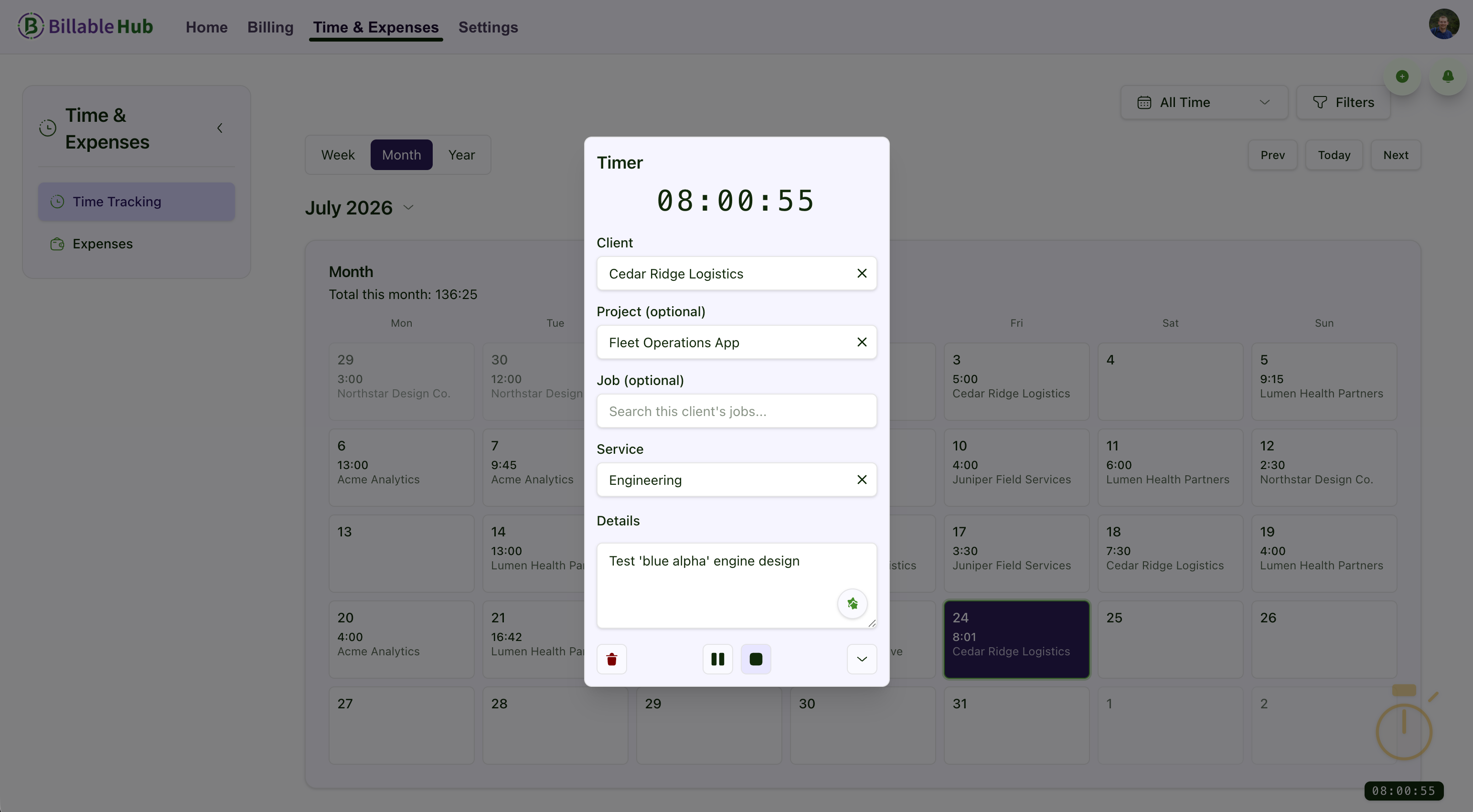
Use live timers or manual entries, resume recent work, and connect time to a client, project, job, and service.
Present scope and pricing before work begins, manage revisions, and optionally request a deposit on acceptance.
Combine billable time, services, expenses, and custom line items into a clear document with notes and payment terms.
Record vendors, categories, receipts, and invoice impact so pass-through costs stay connected to the engagement.
Collect client estimate decisions and, when your plan includes it, route sensitive invoices or estimates through internal approval.
Track delivery and views, use reminders and late-fee policies, and preserve a history of balance and payment changes.
Feature availability varies by plan and add-on. Compare plans .
Flexible billing models
Development engagements rarely use one billing model forever. Billable Hub supports the common ways independent developers structure client work.
Capture billable time throughout the work and use the resulting entries when it is time to invoice.
Quote a defined scope, record the client decision, and create a job or invoice from the accepted estimate.
Bring labor, reimbursable costs, services, and approved additions together on the final bill.
Client-ready detail
Use project and job names, service labels, line-item descriptions, client notes, and document footers to give the client the right level of detail. Ticket numbers, statement-of-work references, milestones, or release context can stay in the descriptions and notes that travel with the billing document.
Clear product boundary
Billable Hub is designed to connect the commercial side of client development. Keep code, tickets, sprint planning, and technical documentation in the tools made for them.
Questions and answers
Straight answers about how Billable Hub fits this billing workflow.
Yes. You can invoice from tracked time and services, create custom line items, or convert an accepted fixed-price estimate into a job or invoice. That makes it possible to use different billing models across clients and projects.
Yes. Time entries can be connected to a client, project, job, and service. Billable Hub also provides recent-work shortcuts and reporting filters so the billing record stays organized as projects multiply.
Use project and job names, line-item descriptions, document notes, or footers to carry the reference a client expects. Billable Hub keeps that commercial context on the billing document without trying to become your issue tracker.
Yes. Clients can accept, decline, ask questions, or request revisions from a focused estimate view. Accepted estimates can create a job, create a deposit invoice, or be converted into a final invoice, depending on the workflow you choose.
Expense tracking can capture a vendor, category, receipt, currency, and invoice impact. Expenses can then be included when you prepare the client invoice.
No. Billable Hub focuses on estimates, billable work, expenses, invoices, client access, receivables, and billing records. It does not currently sync bank transactions or replace an engineering project-management system.
More service-business workflows
A connected billing workflow for small IT, implementation, and software consultancies.
Estimates, team time, expenses, approvals, and client invoices for small agencies.
Professional estimates and invoices for solo consultants and fractional advisers.
Every plan starts with a 90-day trial (no credit card required). Prices exclude applicable taxes.
Core time tracking and invoicing for solopreneurs and small teams.
Welcome Savings
USD per organization · Includes plan seats
Monthly billing
$2.50 /month
First 6 paid months after trial, then the standard price of $5/month.
Annual billing
$22.50 /year
First paid year after trial, then the standard price of $45/year. Billed annually.
Subscribe by December 31, 2026 to use your automatically attached coupon. Keep your remaining trial days; the discount starts after your trial ends.
Advanced invoicing, expenses, automation, and expanded capacity.
Welcome Savings
USD per organization · Includes plan seats
Monthly billing
$7.50 /month
First 6 paid months after trial, then the standard price of $15/month.
Annual billing
$67.50 /year
First paid year after trial, then the standard price of $135/year. Billed annually.
Subscribe by December 31, 2026 to use your automatically attached coupon. Keep your remaining trial days; the discount starts after your trial ends.
Top-tier customization, reporting, team capacity, and AI receipt automation.
Welcome Savings
USD per organization · Includes plan seats
Monthly billing
$25 /month
First 6 paid months after trial, then the standard price of $50/month.
Annual billing
$225 /year
First paid year after trial, then the standard price of $450/year. Billed annually.
Subscribe by December 31, 2026 to use your automatically attached coupon. Keep your remaining trial days; the discount starts after your trial ends.
Start with a 90-day trial
Start with the next estimate, keep the billable work connected, and send a clearer invoice when the project is ready.
No credit card required. Feature availability varies by plan.